17 modules
The full customer and order lifecycle, natively — leads, accounts, products, compliance, orders and more.

AI-Powered CRM · Built for the chemical industry
A chemical-native CRM, 15+ AI agents, and micro solutions like AI Order Management — working above any ERP, with no disruption.
The platform
Add a chemical-native CRM and AI to the system of record you already run — no migration, no disruption.
Live inventory, orders and data flow both ways — Tycan sits on top and adds the intelligence.
One platform, three pillars
A complete CRM, an AI layer under every module, and focused micro solutions that solve the hardest workflows.
The full customer and order lifecycle, natively — leads, accounts, products, compliance, orders and more.
Lead scoring, pricing, order creation, reporting and more — the intelligence running under every module.
Focused AI tools that plug into the CRM. The flagship reads purchase orders and cuts order handling by 80%.
The CRM · 17 modules
Seventeen native modules cover the whole journey — from the first lead to a shipped, tracked order — with chemical compliance built in.
Capture and work every inbound lead.
Bring new accounts live, structured and fast.
Track every deal from first touch.
See the whole pipeline at a glance.
One complete view of every customer.
Every person, role and relationship.
Your full chemical catalog, structured.
Request, ship and track samples end to end.
Raise and manage stocking requests.
Live stock, straight from your ERP.
SDS, TDS and COA from within the CRM.
A portal for orders, invoices and documents.
Real-time sales and operations visibility.
Track and calculate rep commissions.
Resolve pricing and margin exceptions.
AI-assisted order creation, no manual entry.
Roles, access and permissions.
All 17 modules in a single system — working above your ERP.
Native modules · nothing to bolt on · all working above your ERP
The intelligence layer
Purpose-built agents span the whole flow — from first lead to final delivery — running under every module, not bolted on as a chatbot.
Ranks and prioritizes inbound leads automatically.
Recommends optimal pricing by account and product.
Builds CRM sales orders with no manual entry.
Compiles sales and ops dashboards automatically.
Reads incoming purchase orders in any language.
Auto-fills recurring orders and learns every cycle.
Confirms live ERP stock before an order is placed.
Flags below-threshold pricing before confirmation.
Generates the CMR and notifies the transporter in one click.
Pushes live delivery status to the customer portal.
Ten named agents today — more ship in every release.
The order desk is where chemical businesses lose the most time. Tycan collapses every manual step — and it is live in production today.
Why Tycan
Generic CRMs treat the chemical industry as an afterthought. Tycan is designed around how chemical businesses actually work.
SDS, TDS and COA, samples and compliance are built in — never bolted on as an afterthought.
Keep SAP, Infor, Oracle, NetSuite or MS Dynamics. Tycan sits on top — no migration, no disruption.
15+ agents work across the platform — scoring, pricing, reading POs and driving orders automatically.
Up and running in 4–6 weeks, implemented by our own team — no lengthy SI project required.
A portal where customers place orders and pull invoices, SDS and COA — around the clock.
CRM, AI agents and micro solutions in a single system — one login, one source of truth.
Live customers
Tycan isn't a concept. The CRM is implemented and live at chemical companies across three geographies.
FAQ
Book a walkthrough and we'll show the platform, the AI agents, and AI Order Management working the way a chemical business runs.
Company
The people behind Tycan — a global technology and outsourcing team building AI-powered CRM, micro solutions and AI agents for the chemical industry.
The leaders steering Tycan's product, engineering and delivery.

A serial entrepreneur with multiple successful exits. Over 25 years scaling IT — alongside special-needs and sports services — across the USA, Europe, the Middle East and India.

A serial entrepreneur with 20+ years in IT-driven B2B and B2C sales, marketing, product development, consulting and training — having founded startups and operated businesses across the Middle East and India.
A technology and outsourcing company with presence across the US, Europe, the Middle East and India.
Book a walkthrough and meet the people who'll get your chemical business live — above the ERP you already run.
CRM Module · 01
Capture every inbound lead, score it, and work it to conversion on a board built for a sales team — with the Lead Scoring Agent ranking what to touch first.
Leads land in one workspace and move across a New → Contacted → Qualified → Proposal board, each card showing owner, account, source and a live score. The Lead Scoring Agent ranks them, so reps always know the next best lead to work.
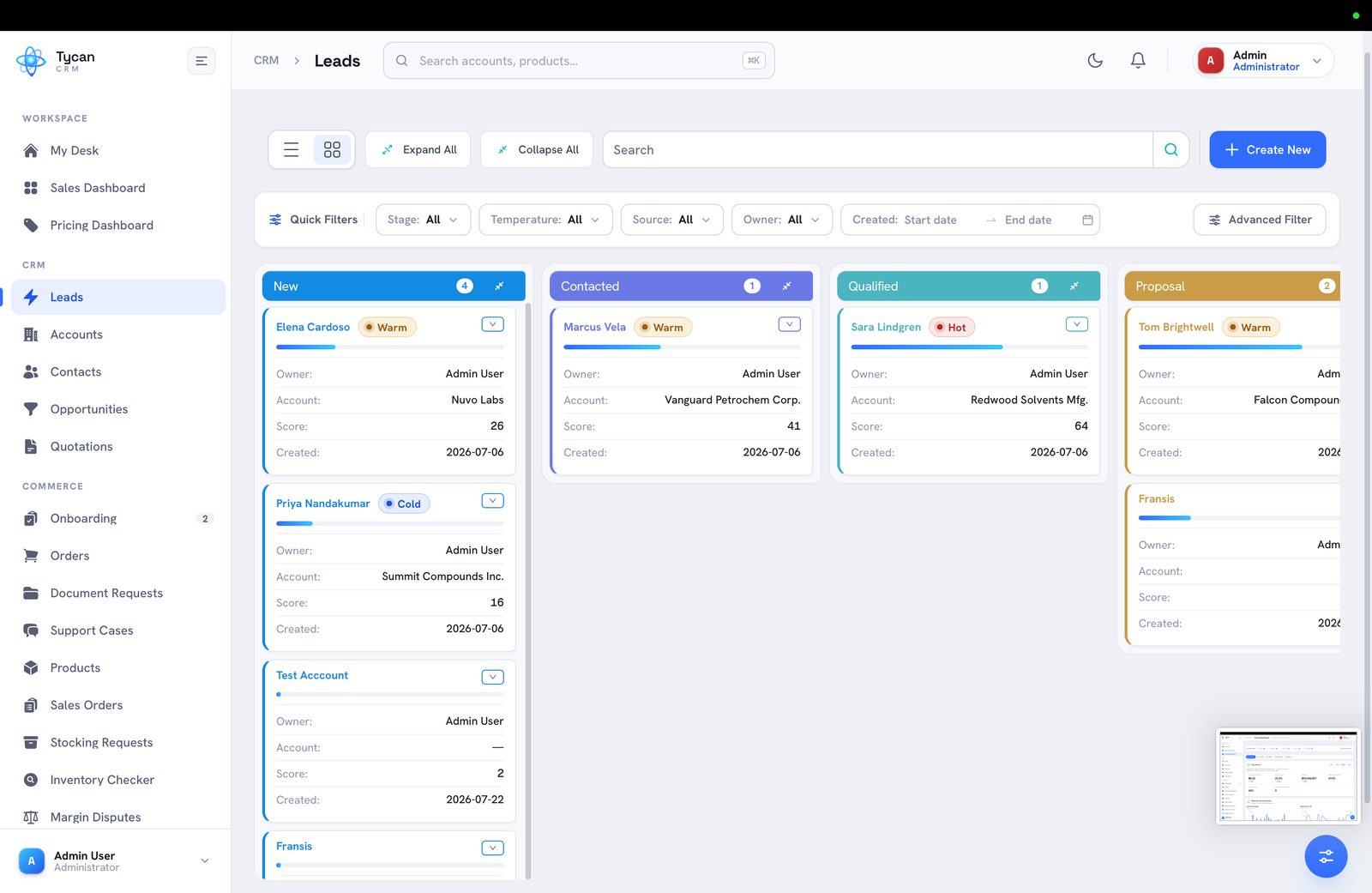
Switch between a Kanban board and a dense list, filter to your slice, and act on any lead in a click.
Flip between a drag-and-drop Kanban and a list view, then expand or collapse stages to focus on the work in front of you.
Quick filters for stage, temperature, source and owner — plus a date range and advanced filter — narrow hundreds of leads to the ones that matter now.
Hot, warm and cold badges and a score bar on every card make lead quality readable without opening a record.
The intelligence layer prioritises the work; the workflow makes sure nothing is dropped.
Book a walkthrough and we'll show Leads & Follow-up — and the rest of the platform — working the way a chemical business runs.
CRM Module · 02
Bring every new account live the same way — a tracked, multi-step onboarding with approvals, payment terms and documents, ready to sync with your ERP.
Onboarding turns a win into an orderable account with a governed workflow. Each onboarding carries a stage, an approval state, a payment mode and a current step, so everyone can see exactly where a new account stands.
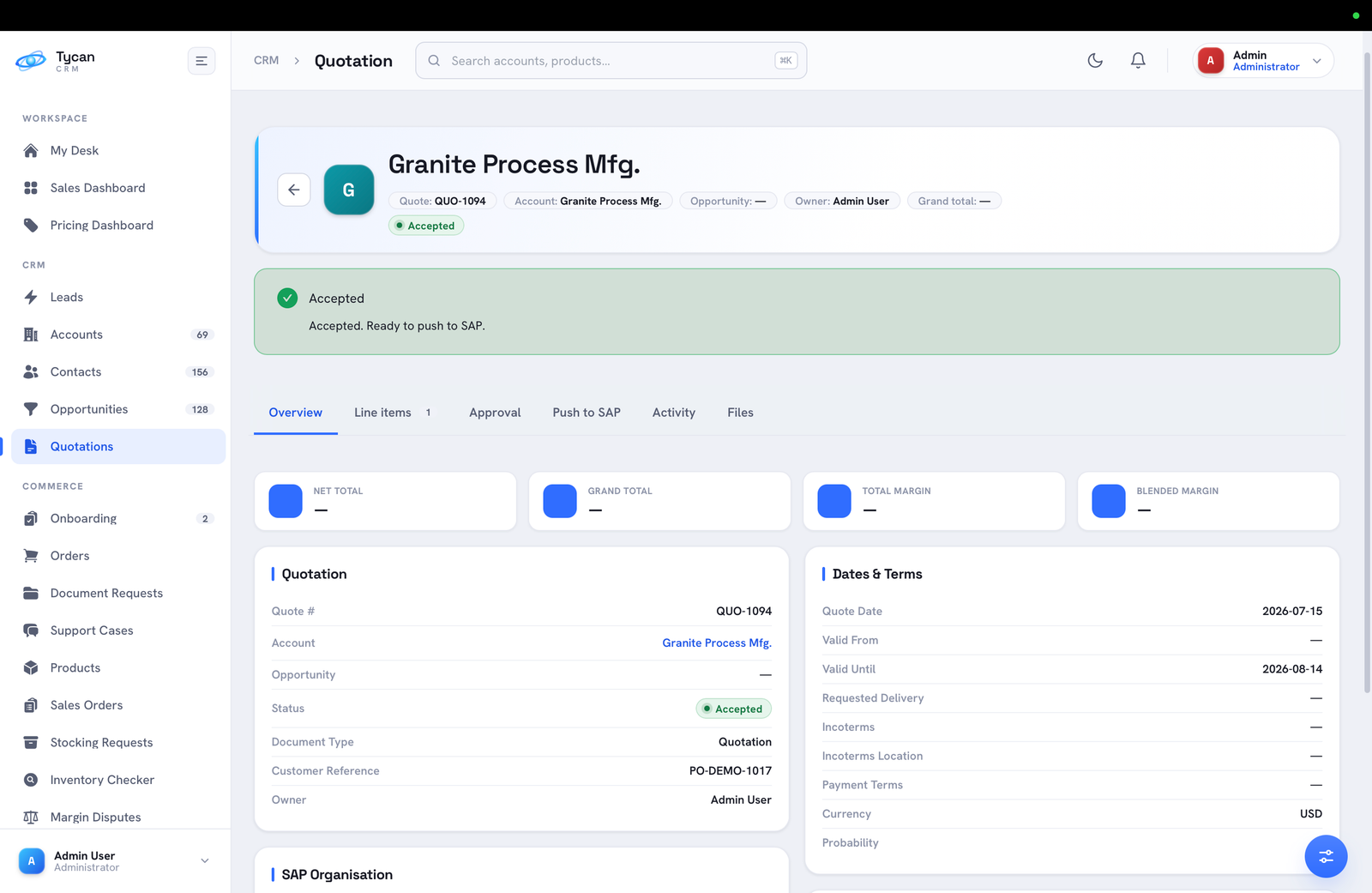
From the first link sent to final approval, every onboarding is tracked and auditable.
Watch each account move through Required → Link Sent → In Progress → Submitted → Approved, with the current step always on show.
A pending or approved state sits alongside the stage, so credit and compliance sign-off never happen off-system.
Payment mode — Credit Card, COD, Cash in Advance or Credit terms — is set during onboarding, not discovered at the first order.
Onboarding builds on the record you already have and hands a clean account to your ERP.
Book a walkthrough and we'll show Customer Onboarding — and the rest of the platform — working the way a chemical business runs.
CRM Module · 03
Track every deal from first touch to close — value, stage, products and account — on a board that reads as a live, weighted forecast.
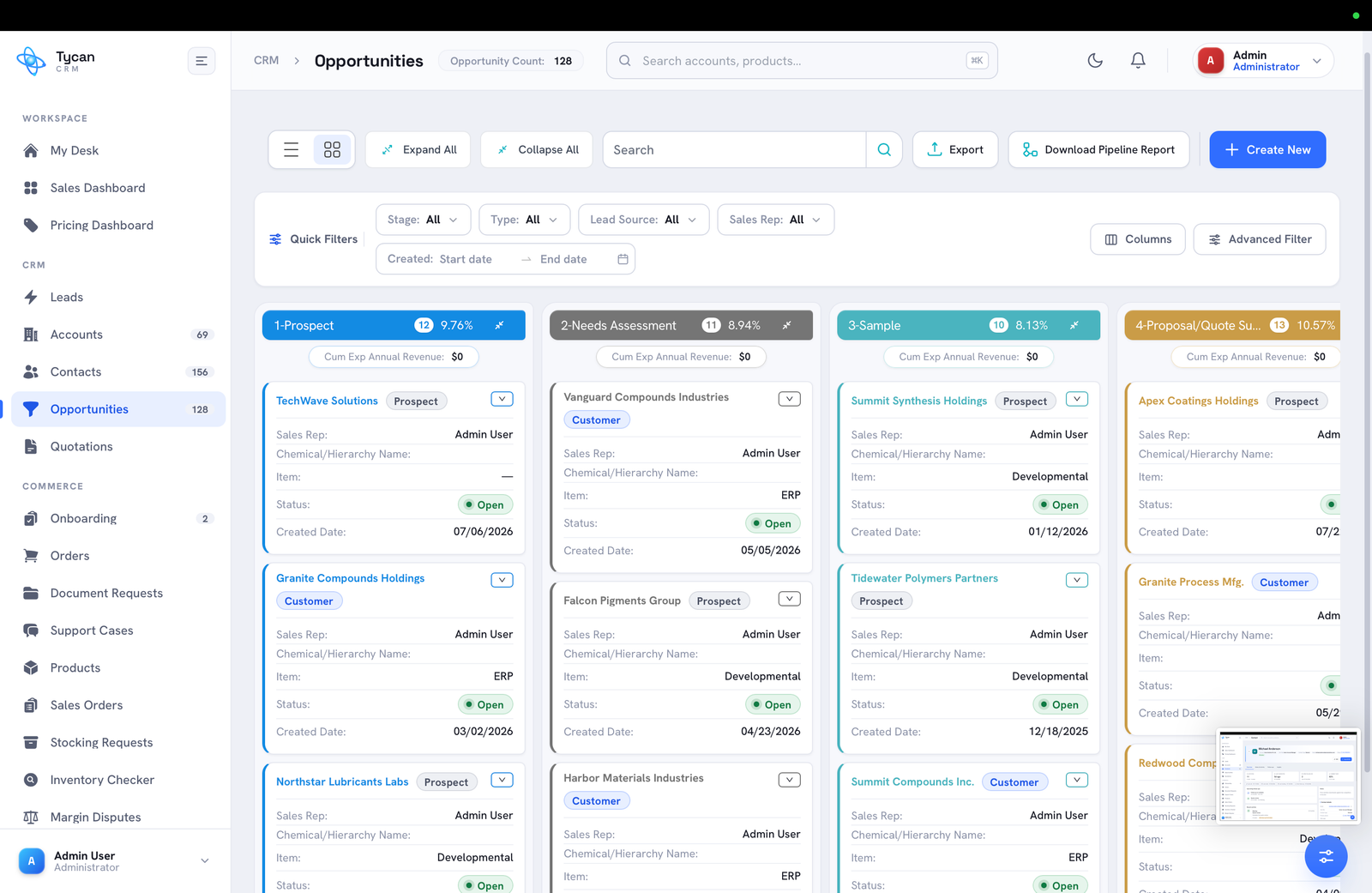
Opportunities give each deal a home and a stage, from Prospect through Needs Assessment, Sample and Proposal. Each card shows the account, sales rep, chemical and expected revenue, and every stage carries a win probability — so the board doubles as a forecast.
Opportunities are tied to accounts and carry the detail a chemical deal needs.
Each opportunity rolls up to its account and shows whether it is a prospect or an existing customer, so history and pricing are one click away.
Capture the chemical or hierarchy, the item, and whether it is an ERP or developmental product, right on the deal.
Stage win-rates turn the board into a forecast, with cumulative expected annual revenue rolled up per column.
When a deal is ready to price, it flows straight into a quotation — no re-entry.
Book a walkthrough and we'll show Opportunities — and the rest of the platform — working the way a chemical business runs.
CRM Module · 04
See your whole pipeline on one board — drag deals through stages, read win probability by column, and spot what's stuck before it hurts the forecast.
The pipeline board turns open opportunities into a visual funnel. Each column is a stage with its own win probability and cumulative expected revenue, so the health of the funnel is legible the moment you open it.
Column totals, probabilities and card detail make the state of the business obvious.
Move a deal between stages with a drag; its status, dates and weighted value update everywhere at once.
Each stage carries a win rate, so cumulative expected revenue per column is a forecast, not a guess.
Deals sitting too long stand out, so managers step in while there is still time to act.
Filter, expand and drill without leaving the board.
Book a walkthrough and we'll show Pipeline (Kanban) — and the rest of the platform — working the way a chemical business runs.
CRM Module · 05
The central hub for every customer and prospect — a complete view of account activity, pricing, sales history, contacts, and opportunities, synced with your ERP.
Every customer and prospect lives in the same place — with the right level of access for each.
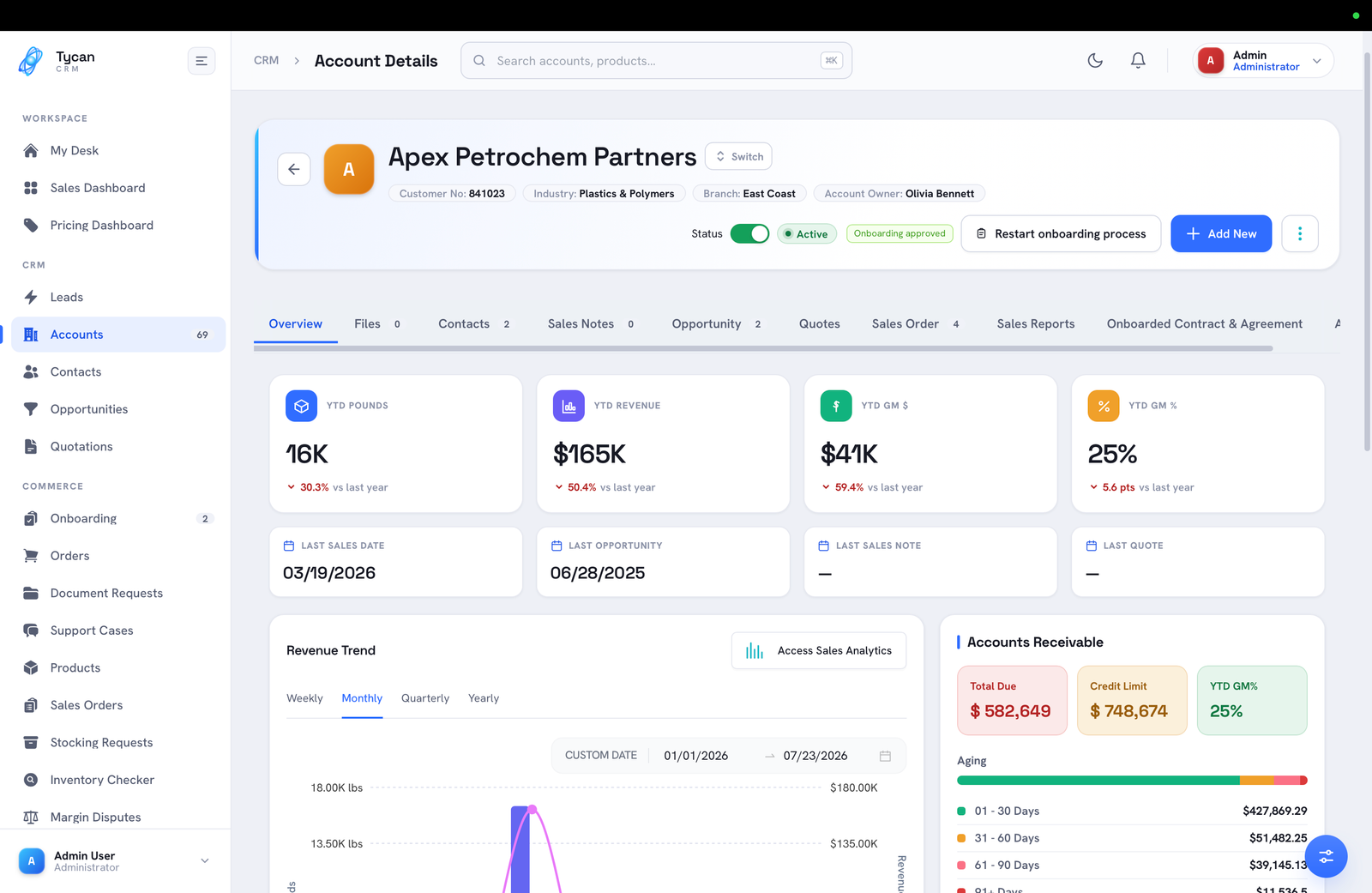
Active customers that sync automatically from your ERP, with full access to every tab — Overview, Contacts, Sales Notes, Opportunities, Quotes, Sales Orders, and Activity Log. ERP customers are read-only in CRM: changes are made in your ERP and sync straight back, so the system of record stays the source of truth.
Potential customers created directly in CRM, with access to Overview, Contacts, Sales Notes, Opportunities, and Quotes. Prospects are fully editable and support a soft delete — a reason is always captured before a record is removed.
Find any account in seconds and shape the view around how your team works.
Quick-search by account name or number right on the listing — or run a company-wide global search across account name, sales rep, subsidiary, ship-to name, address, and customer code without leaving the page.
Filter by customer, account type, sales rep, ship-to city/state, industry, facility, and status. Show or hide columns to suit each user, then export exactly what's on screen — applied filters carry into the export.
Accounts never quietly go stale — the system watches activity and prompts the right people.
ERP customers are flagged inactive after 18 months with no sales orders. The rep gets automated reminders at 60 and 30 days, and a notification goes out at the threshold to confirm the status.
A user can mark an account inactive with a required reason. A confirmation and an email notification to the Pricing team follow, and the CRM status updates once your ERP is in sync.
Prospects can be inactivated and reactivated directly in CRM, each with a reason captured in the Activity Log — no ERP round-trip required.
Switch between accounts without leaving the page, then work the whole relationship across purpose-built tabs.
YTD revenue, gross margin and margin %, key activity dates, and a revenue / pounds / margin trend view — plus accounts-receivable detail (total due, credit limit, balance, terms, aging) and one click into pre-filtered Sales Analytics.
Manage all contact types on the account. Changes to statutory contacts — SDS/TDS, COA, Pricing, Invoice — automatically notify the Pricing team so your ERP stays in step.
Sales Notes and Competitor Notes kept separate, follow-ups and appointments with reminders, an automated weekly report to reps and managers, and a downloadable Sales Visit Report.
Every opportunity tied to the account, with the ability to create a new one inline and jump straight to its detail page.
Current pricing from your ERP alongside exploratory Proposed Quotes — a summary panel, powerful filters, flat and grouped drill-down views, and guided price add / change requests that route to the Pricing team with both internal and customer-ready emails.
A view-only order history for the account, plus a chronological Activity Log capturing every user- and system-generated action with a timestamp and source.
The Quotes tab turns pricing from a spreadsheet scramble into a guided, auditable request.
New customers arrive from your ERP automatically, and matching records are reconciled cleanly.
When a customer is created in your ERP, the account syncs to CRM and appears alongside existing prospects — no manual step, no lost data.
If a matching prospect already exists, Sales Support can merge it into the ERP customer. Notes, contacts, quotes, opportunities and activities all carry over; merging is restricted to prevent mistakes.
Reactivated customers sync and update automatically, with the ERP customer number as the reference key so duplicate accounts never creep in.
Book a walkthrough and we'll show Accounts 360° — and the rest of the platform — working the way a chemical business runs.
CRM Module · 06
Every contact in one place — including the statutory, business-critical contacts that keep chemical orders moving and compliant.
View, add, edit and manage every customer contact — standard and statutory alike — from a single, filterable listing.
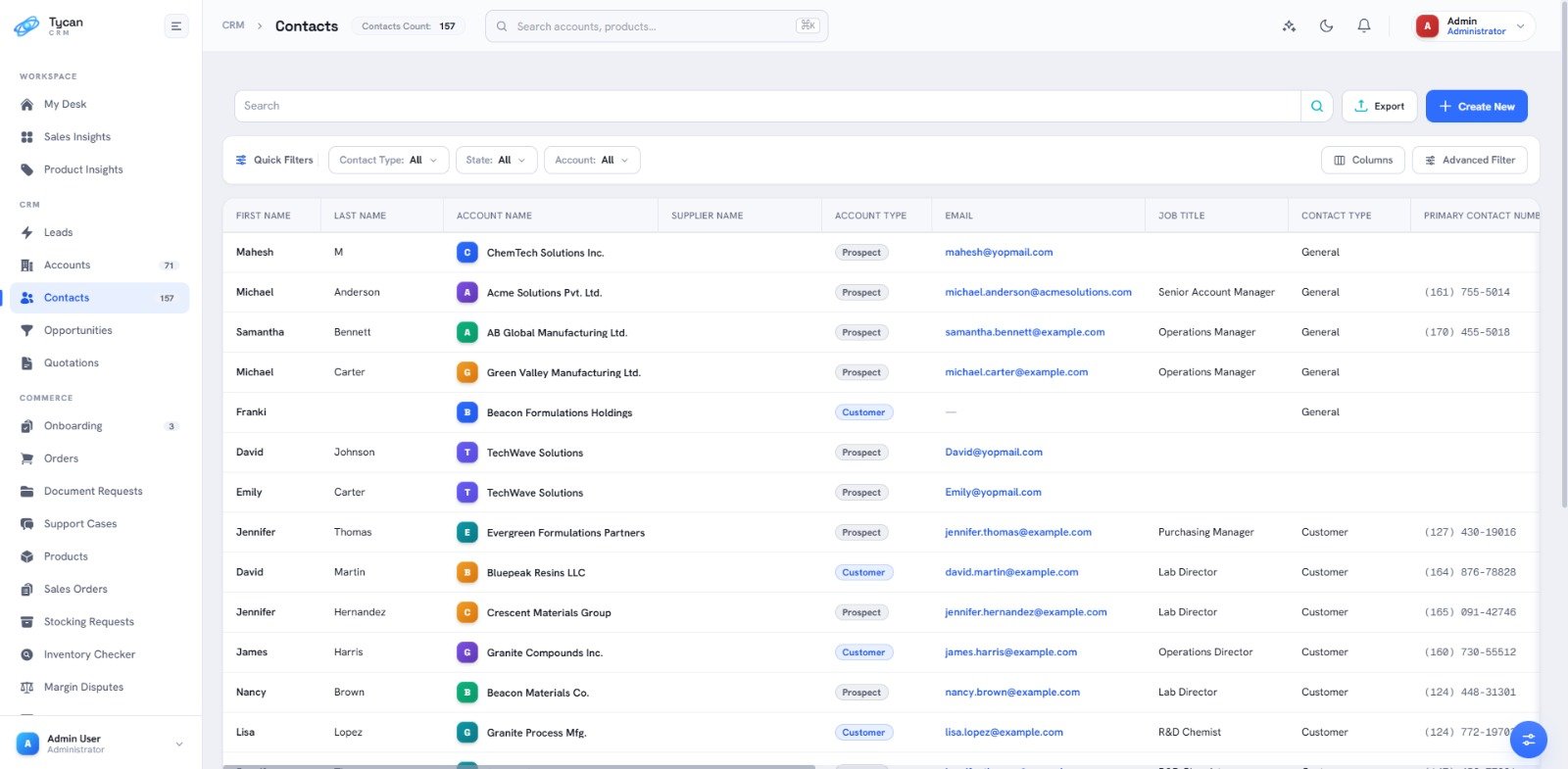
A live contact count, quick search, and filters across account, contact type, created-by, email, first/last name, job title, state and supplier — with per-row edit and delete actions.
Names, account and supplier, type, email, up to four phone numbers, full address and audit fields — shown as columns you can show, hide, and export (filters carry into the export).
Contacts aren't just names — they're the statutory, business-critical roles that keep chemical orders moving. Every type the industry needs is here.
The form asks for exactly what each contact type needs, and keeps compliance-critical records in sync automatically.
Mandatory fields adapt to the contact type — statutory types such as SDS/TDS, COA, Pricing and Invoicing require an email, while Sample Customers capture full address details.
Add as many email addresses to a contact as you need — simply press the spacebar after each entry.
Editing a statutory contact's name or email, or deleting one, automatically notifies the Pricing team so the change is reflected in your ERP.
For the contacts that orders and compliance depend on, nothing falls through the cracks.
SDS/TDS, COA, Pricing and Invoicing contacts are treated as business-critical and are kept in sync with your ERP at all times.
On create, edit or delete, CRM notifies the Pricing team (CC: account owner and requestor). Once your ERP is updated, the change syncs straight back into CRM on the next cycle.
Book a walkthrough and we'll show Contacts — and the rest of the platform — working the way a chemical business runs.
CRM Module · 07
Your full chemical catalogue, structured and searchable — CAS numbers, packaging, ERP identifiers and live performance on every product.
Products is the backbone of the CRM: one organised catalogue, structured by hierarchy the way a chemical business thinks. Each product carries its ERP number, CAS number, packaging and live sales performance, and everything — pricing, quotes, samples, orders — references the same record.
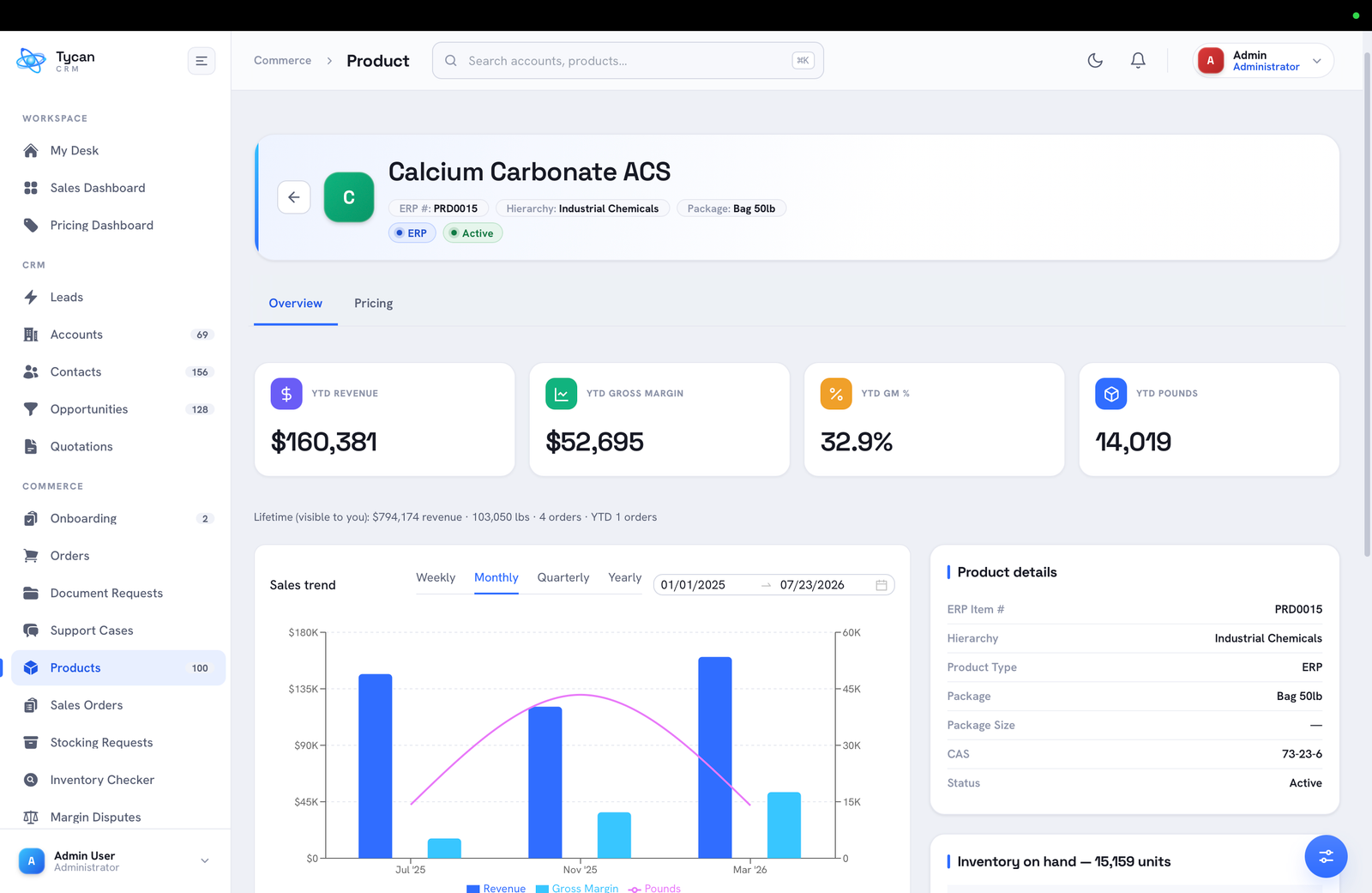
The identifiers and attributes chemical selling depends on, on every product.
Organise the catalogue by product hierarchy — industrial chemicals, reagents and beyond — so pricing and reporting work at the level you choose.
CAS number, ERP item number, packaging and product type live on the record, so quantities and quotes are always expressed correctly.
YTD revenue, gross margin, GM% and pounds — plus a sales trend and lifetime totals — sit on the product itself.
Live pricing and inventory make the catalogue the single source your team quotes and orders from.
Book a walkthrough and we'll show Products — and the rest of the platform — working the way a chemical business runs.
CRM Module · 08
Request, ship and track samples end to end — so nothing goes missing between the lab, the warehouse and the customer, and every sample has a next step.
Samples are how chemical deals get won, and the easiest thing to lose track of. Samples Management keeps every request visible from the first ask to delivery and follow-up, tied to the account, product and contact it belongs to.
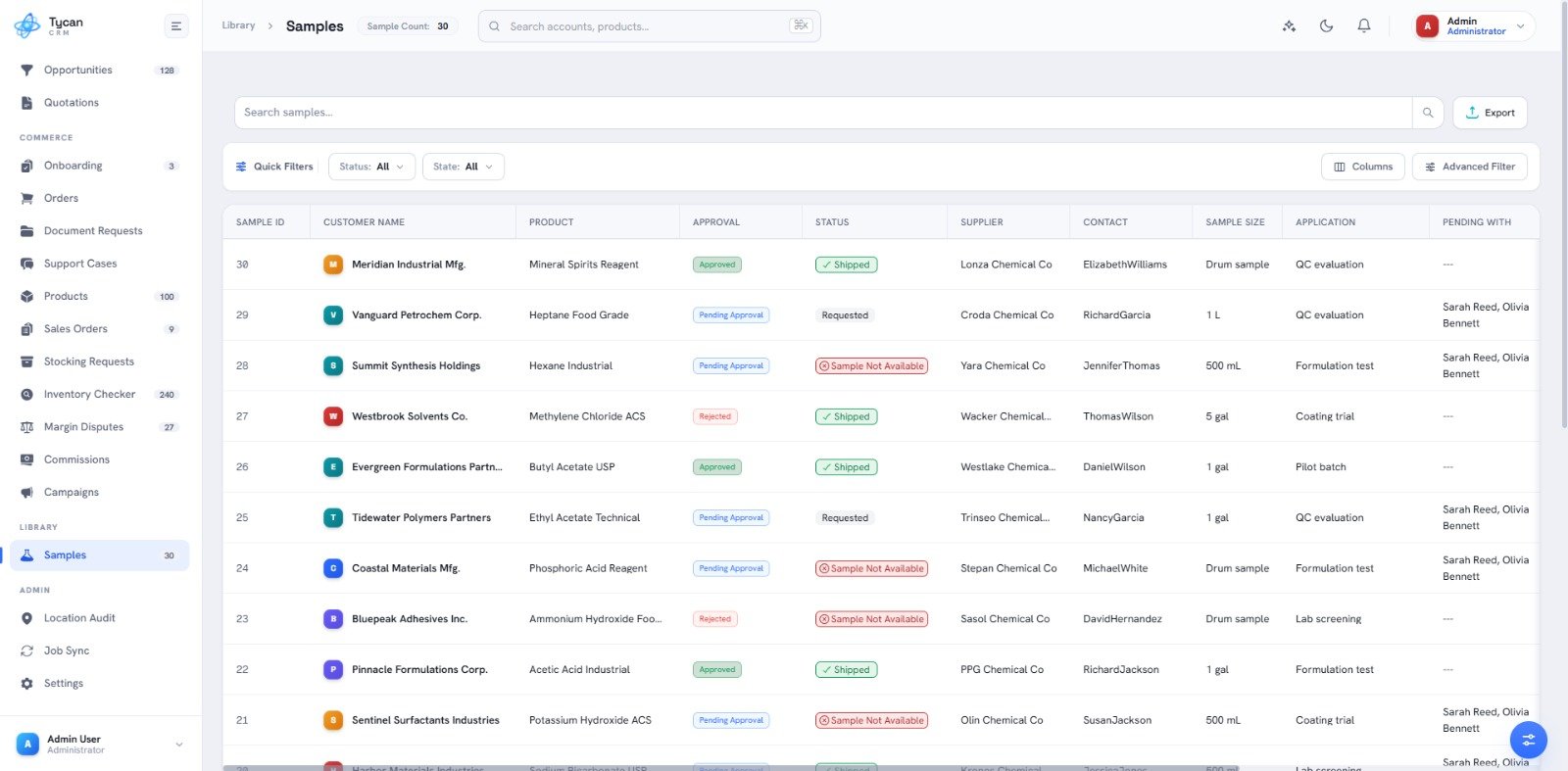
From request to result, sample activity stays on-system.
Raise a sample against an account and product, capturing quantity, the sample contact and why it is needed.
Follow each sample through preparation, dispatch and delivery, visible to sales and the warehouse alike.
Scheduled follow-ups prompt the rep to close the loop, so a promising sample becomes an opportunity instead of going cold.
Samples draw on the same catalogue, contacts and compliance as everything else.
Book a walkthrough and we'll show Samples Management — and the rest of the platform — working the way a chemical business runs.
CRM Module · 09
Raise and manage stocking requests in one place — a clear trail from a rep's ask to a stocking decision, planned against real inventory.
When a rep needs a product stocked closer to a customer, Stocking Request turns that ask into a tracked request instead of an email chain — carrying the product, quantity and destination through a clear approval trail.
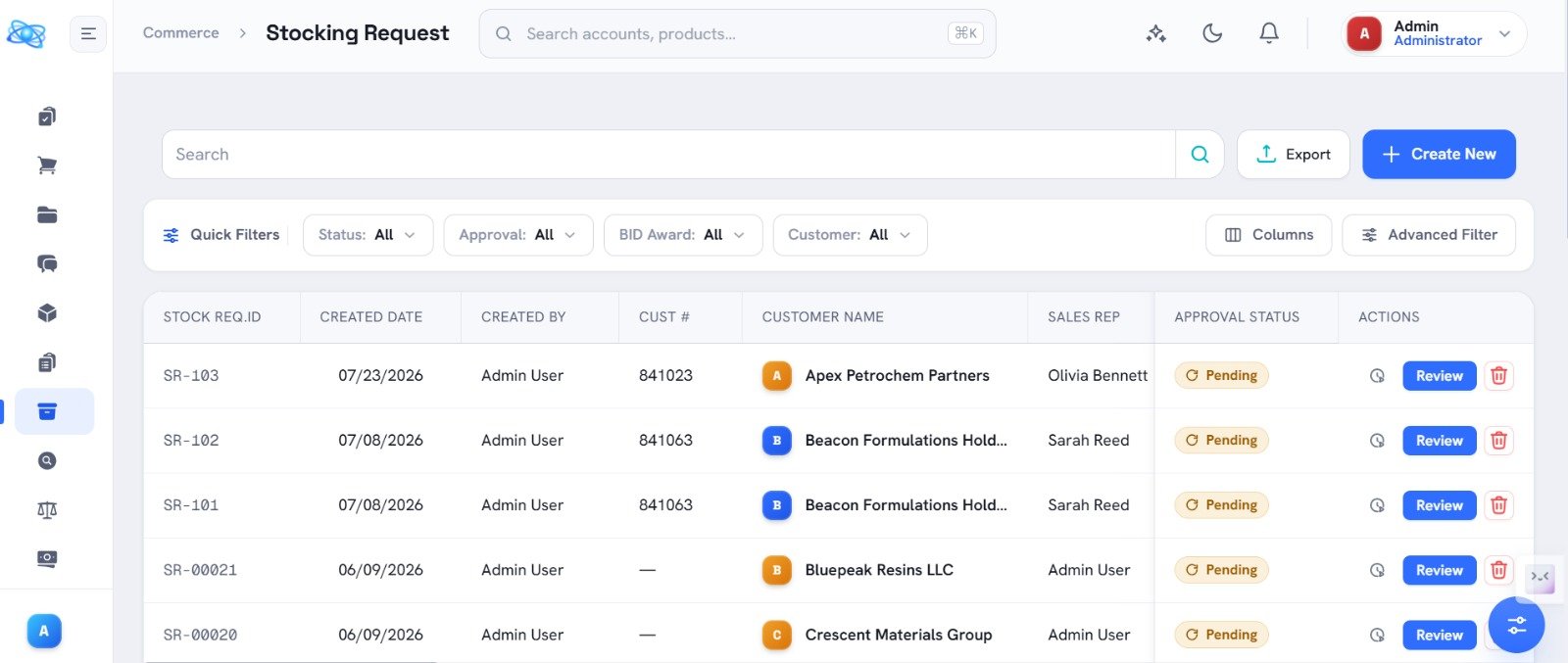
A stocking request makes its own case and moves to a clear outcome.
Capture product, quantity, destination facility and the customer demand behind it — the request makes its own case.
Requests move to the right approver with status visible to all, replacing back-and-forth email with one shared view.
Approved, held or declined, the outcome and its reason are recorded so reps always know where a request stands.
Stocking decisions are planned against live availability, not guesswork.
Book a walkthrough and we'll show Stocking Request — and the rest of the platform — working the way a chemical business runs.
CRM Module · 10
Live stock levels, straight from your ERP — so your team quotes and orders against what's actually available, and the Inventory Check Agent confirms it before you commit.
Inventory Sync reads stock directly from your ERP and surfaces it across the CRM. Reps see real availability the moment they quote or order, and the Inventory Check Agent confirms stock before an order is committed.
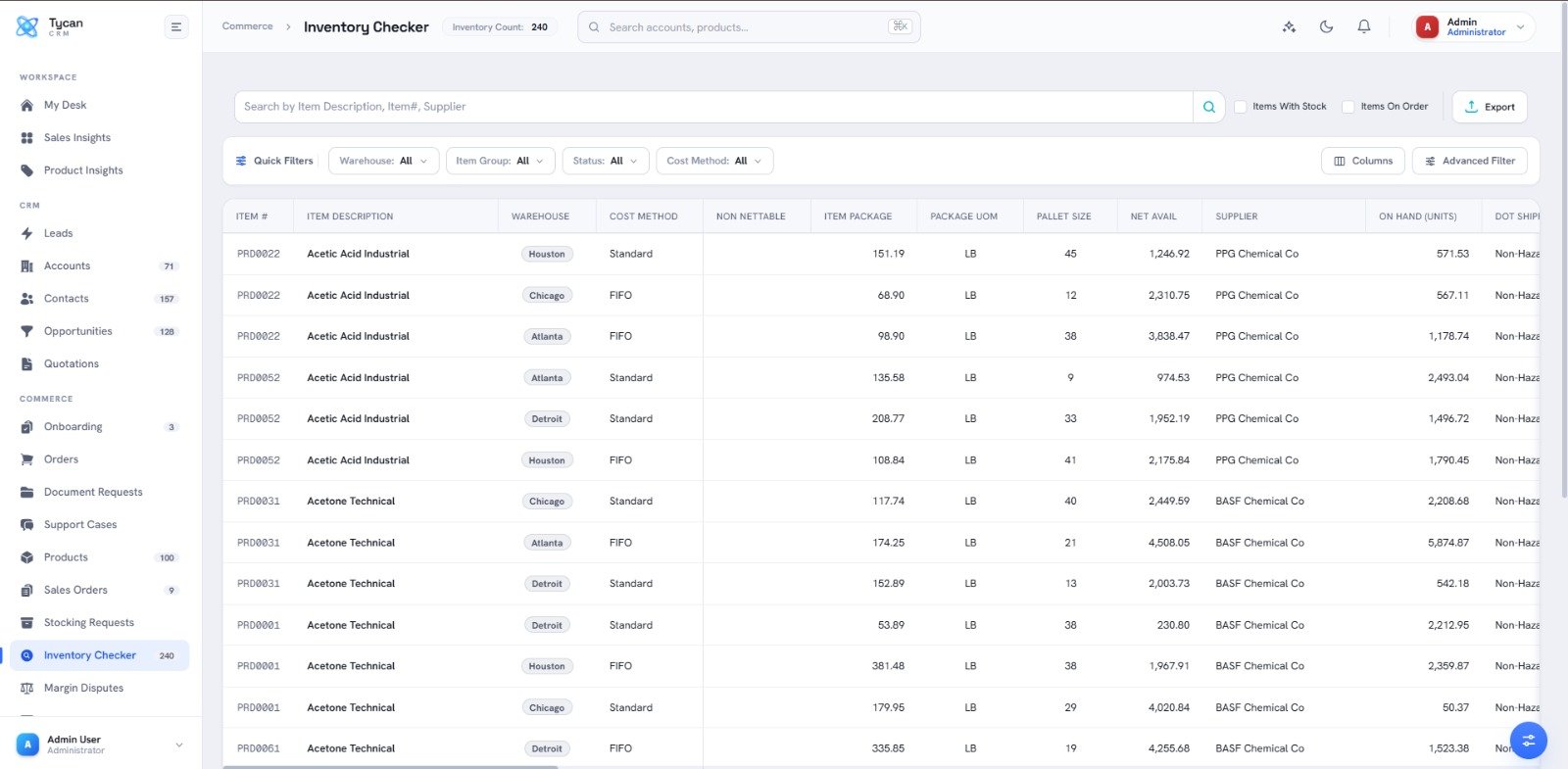
The stock number reps see is the real one, at the moment it counts.
Stock is read from your system of record — SAP, Infor, Oracle, NetSuite or MS Dynamics — so the number reps see is the real one.
Availability by facility means reps promise from the location that can actually deliver.
The Inventory Check Agent confirms stock as an order is built, catching shortfalls before they reach the customer.
The same live picture runs through quoting, ordering and stocking.
Book a walkthrough and we'll show Inventory Sync — and the rest of the platform — working the way a chemical business runs.
CRM Module · 11
SDS, TDS and COA at your fingertips — inside the CRM, tied to the products, accounts and contacts they belong to, so orders never stall for a missing document.
Chemical selling runs on documents. Compliance keeps SDS, TDS and COA where the work happens — attached to the right product and account — so the current document is always one click from a quote, an order or the customer.
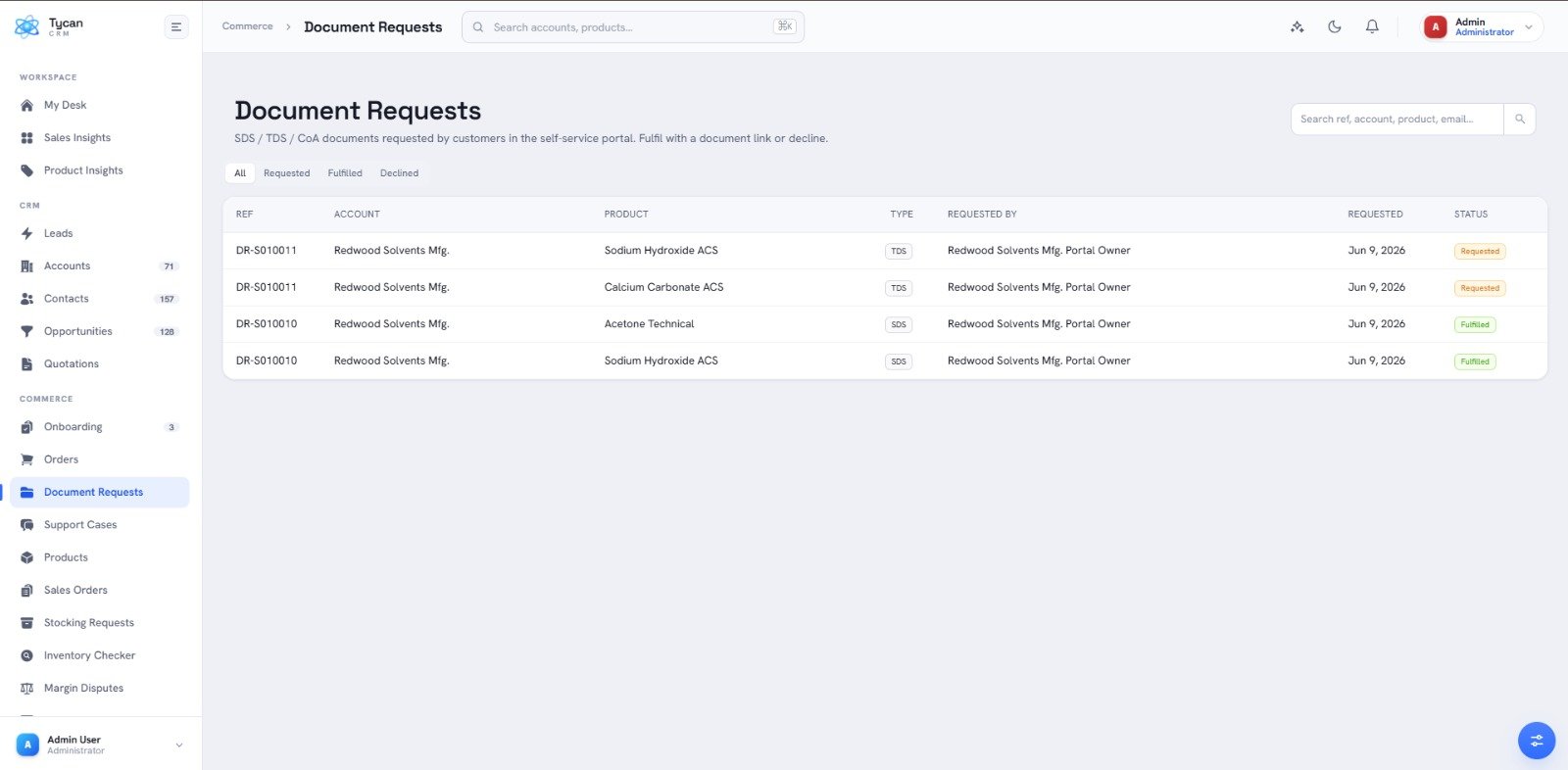
Documents live with the products, accounts and contacts they belong to.
SDS, TDS and COA attach to the products they describe, so the current version travels with every quote, order and sample.
Documents map to the accounts and statutory contacts that need them, so the right people get the right paperwork.
Superseded files are kept for the record while the latest version is the one served — no guessing which is live.
The right document is always to hand, for your team and your customers.
Book a walkthrough and we'll show Compliance (SDS/COA) — and the rest of the platform — working the way a chemical business runs.
CRM Module · 12
A branded portal your customers use around the clock — to place and repeat orders, pull invoices, and download their own SDS and COA.
Self-Service gives customers a secure window into their own account. They place and reorder, track deliveries and pull documents at any hour — fewer routine calls for your team, faster answers for them.
The routine requests that fill your inbox, handled by the customer.
Customers place new orders and repeat previous ones from their own catalogue and history, priced from your ERP.
Invoices, SDS and COA download on demand, without an email to your team.
Live delivery status, pushed by the Delivery Tracking Agent, keeps customers informed without a call.
Branded to you, scoped to each customer, and wired into the same order desk.
Book a walkthrough and we'll show Customer Self-Service — and the rest of the platform — working the way a chemical business runs.
CRM Module · 13
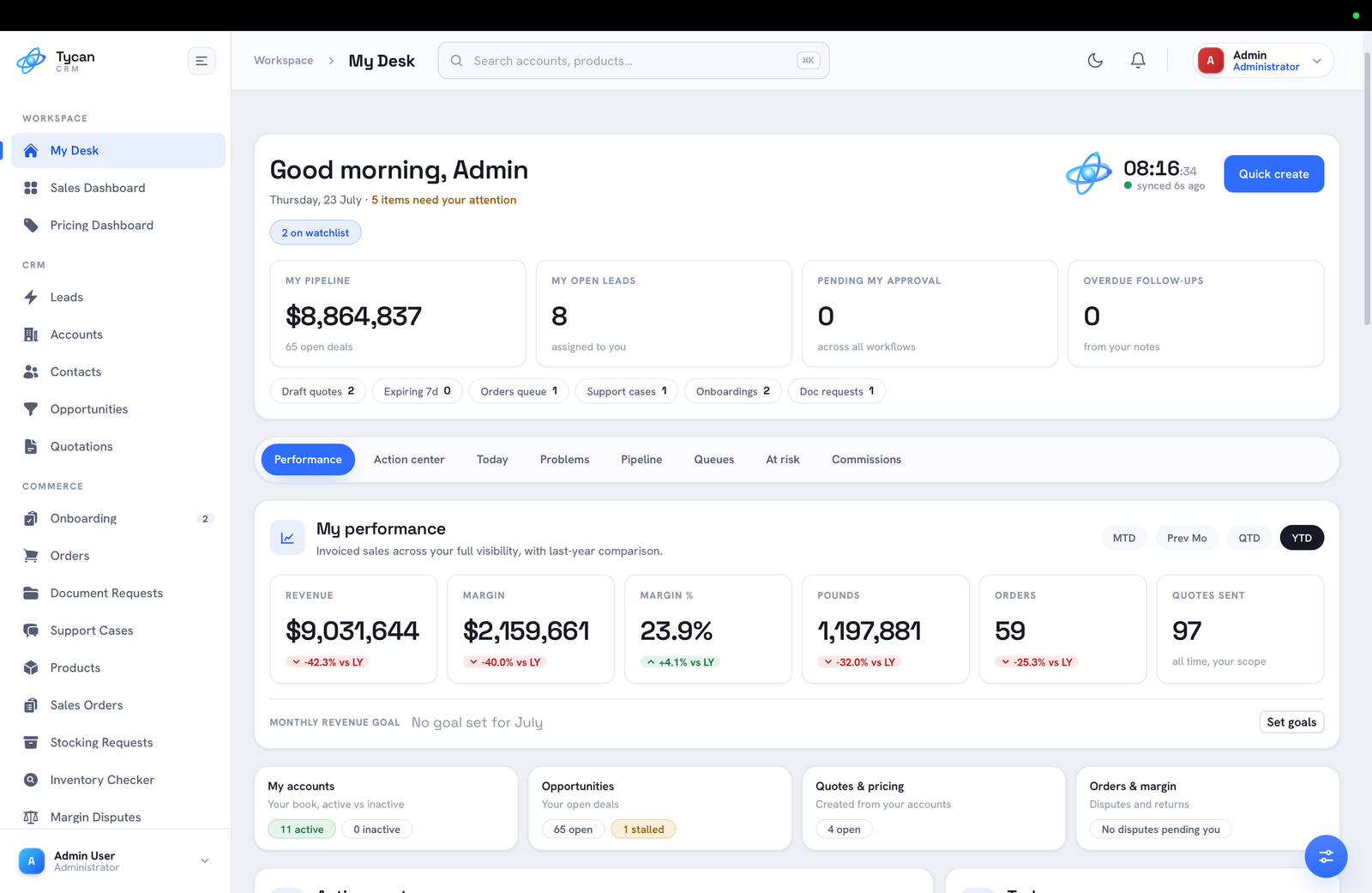
Real-time visibility into sales and operations — revenue, margin, pounds and per-pound economics, compiled automatically and filterable to any slice of the business.
The Sales Dashboard turns everyday CRM activity into a clear picture of performance. Revenue, margin, pounds, orders and per-pound economics are compiled automatically and compared against last year, across MTD, QTD and YTD.
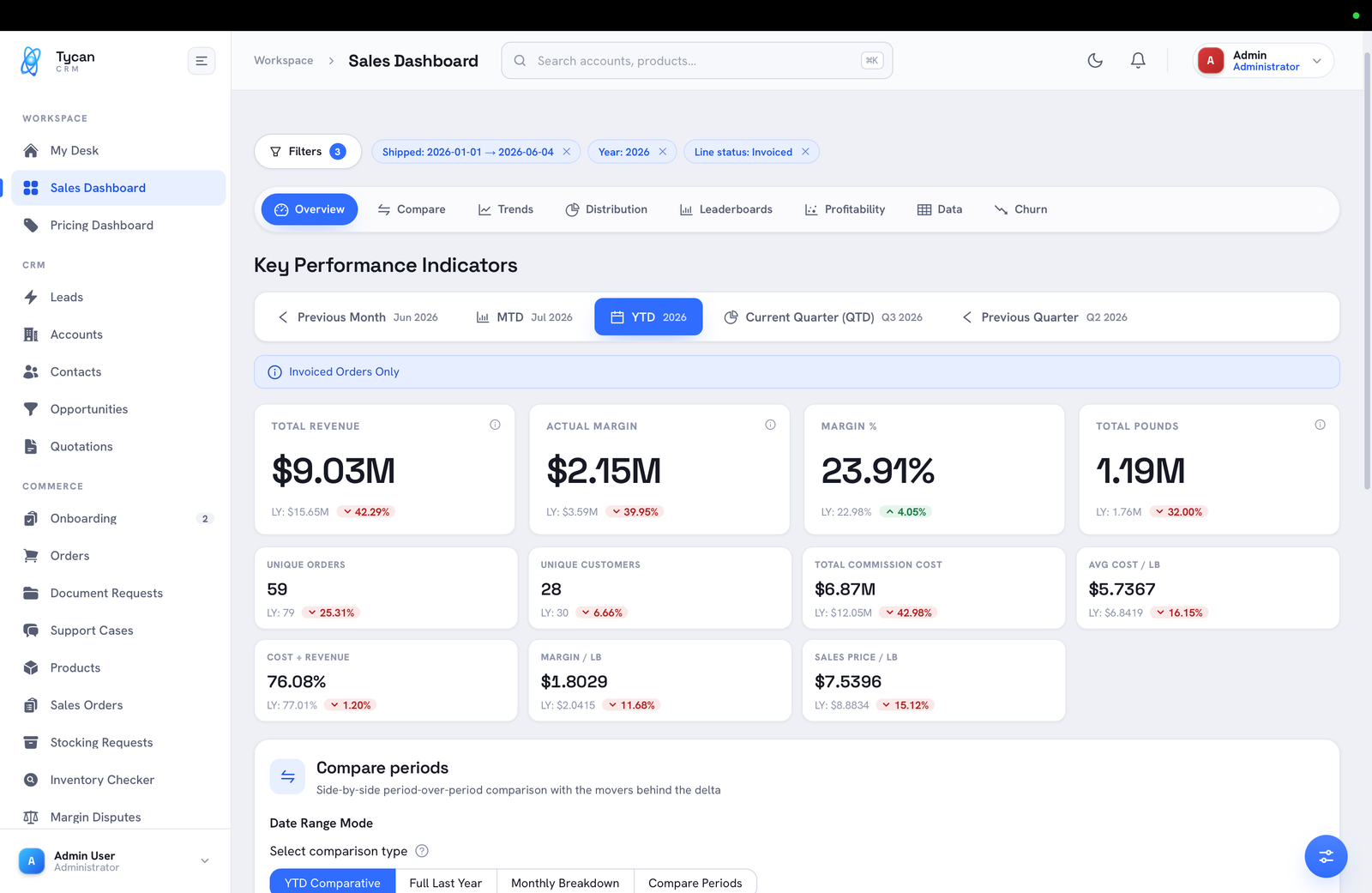
The metrics a chemical business lives on, sliced the way you work.
Track top line, gross margin, GM% and tonnes — plus cost, margin and sales price per pound — trended and compared to last year.
Overview, Compare, Trends, Distribution, Leaderboards, Profitability, Data and Churn views answer different questions from the same data.
Scope to invoiced orders for numbers that reconcile, with clear toggles for MTD, QTD, YTD and prior periods.
Beyond the company view, each user opens to their own cockpit.
Book a walkthrough and we'll show Sales Dashboard — and the rest of the platform — working the way a chemical business runs.
CRM Module · 14
Track and calculate rep commissions transparently — tied to the orders, pricing and margin already in the system, so what's earned is clear and defensible.
Commission takes the numbers already in the CRM — orders, pricing and margin — and turns them into commission a rep can see and trust. No parallel spreadsheet, no month-end guesswork.
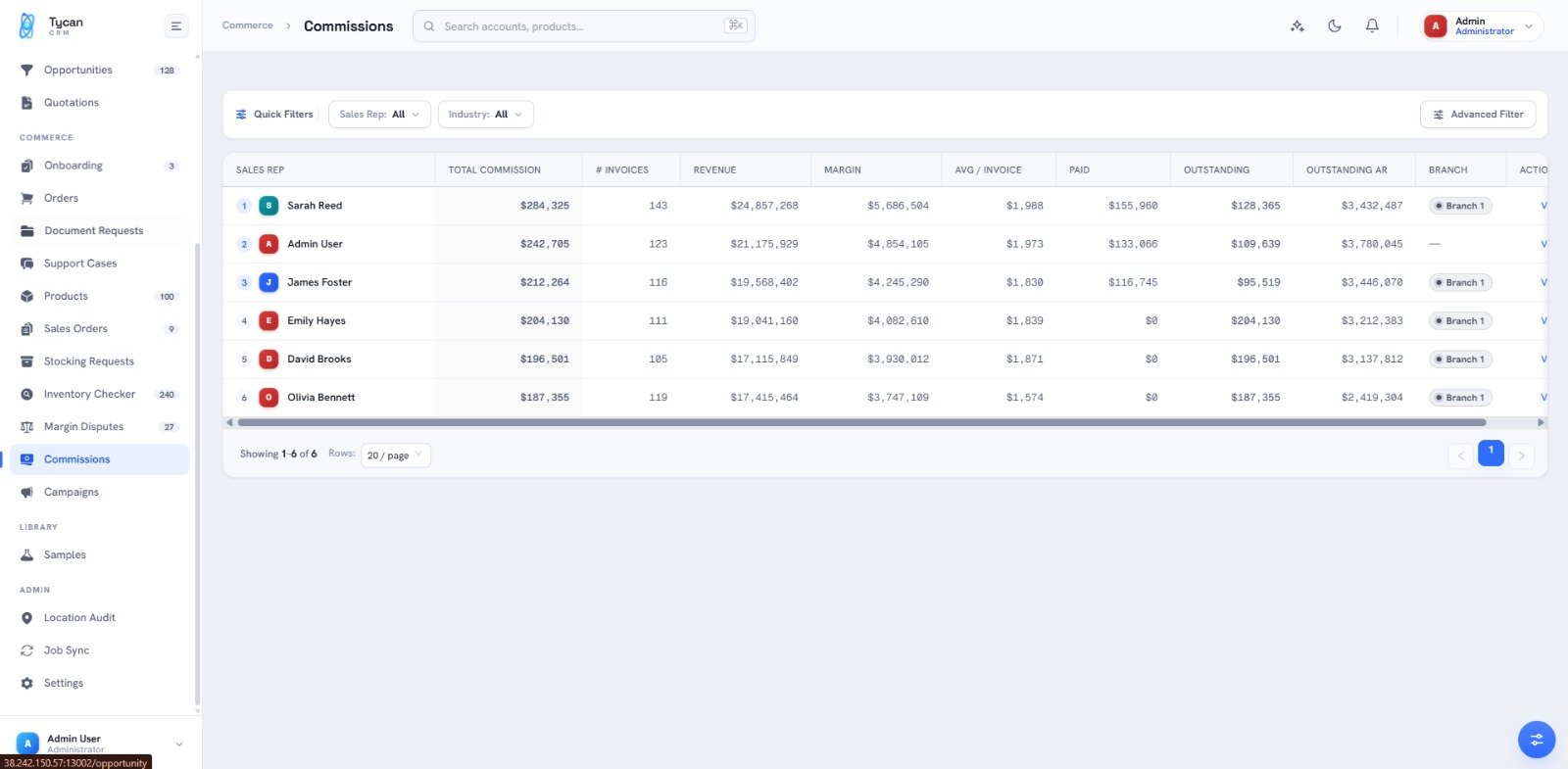
Every figure ties back to an order that actually shipped.
Commissions calculate from the actual orders and margin in CRM, so the figure always ties back to something real.
Each rep sees the orders behind their statement, which builds trust and cuts month-end disputes.
Structures are configured to match how you pay — by margin, revenue or product.
Statements that stand up to scrutiny and reflect the rest of the system.
Book a walkthrough and we'll show Commission — and the rest of the platform — working the way a chemical business runs.
CRM Module · 15
Raise and resolve pricing and margin exceptions through a structured, auditable workflow — flagged automatically, routed for a decision, and kept on the record.
When a deal needs pricing below threshold, Margin Dispute replaces the hallway conversation with a tracked request. The Margin Guardrail Agent flags the exception, and it routes to the right people for a decision that is captured for good.
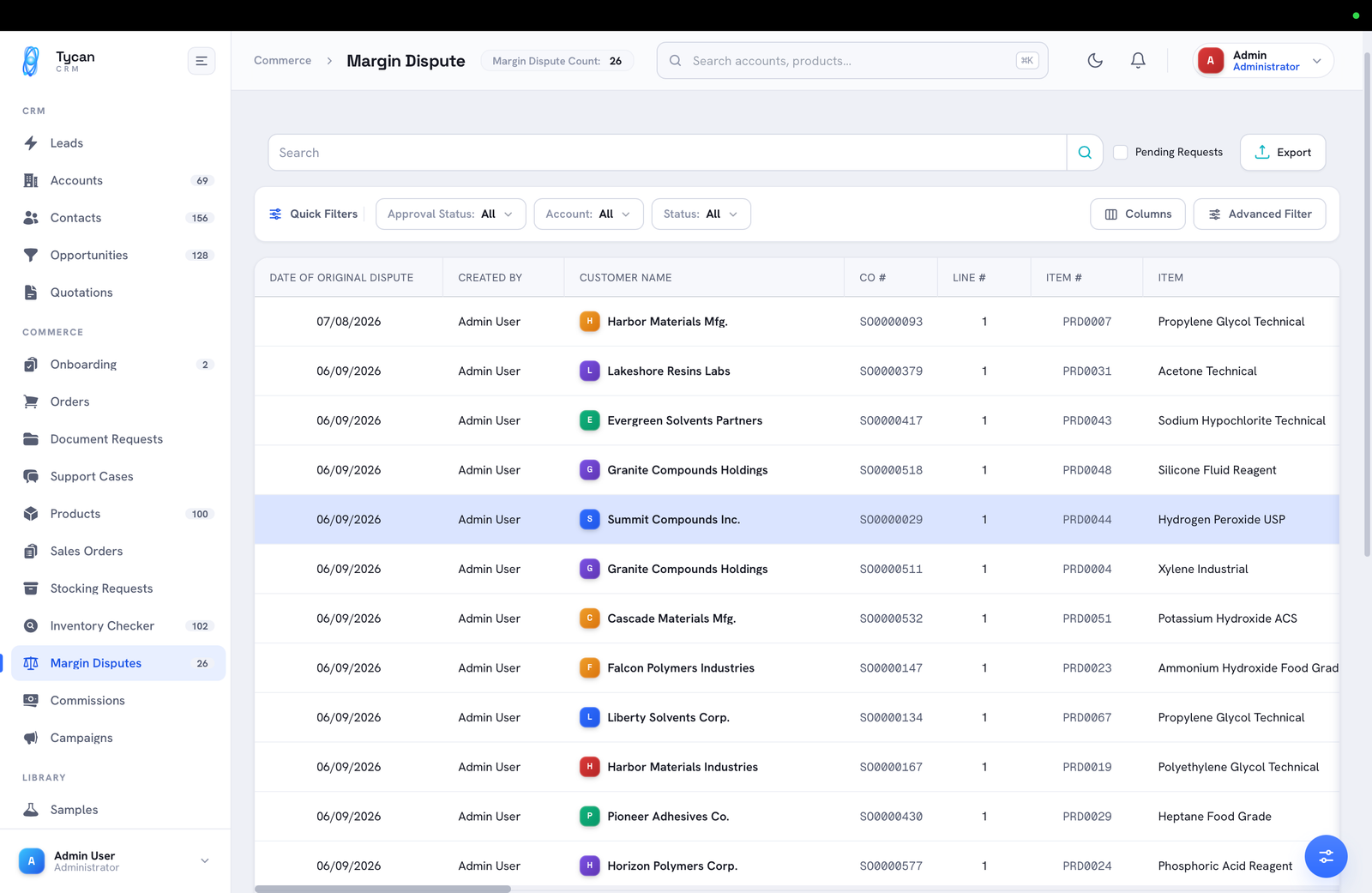
Caught early, decided by the right people, recorded for good.
The Margin Guardrail Agent catches below-threshold pricing before an order is confirmed — exceptions are caught, not discovered later.
Each dispute reaches the right approver with the numbers attached — the order, item and margin at stake.
Approve or decline with a comment; the whole decision is logged, so pricing stays consistent and auditable.
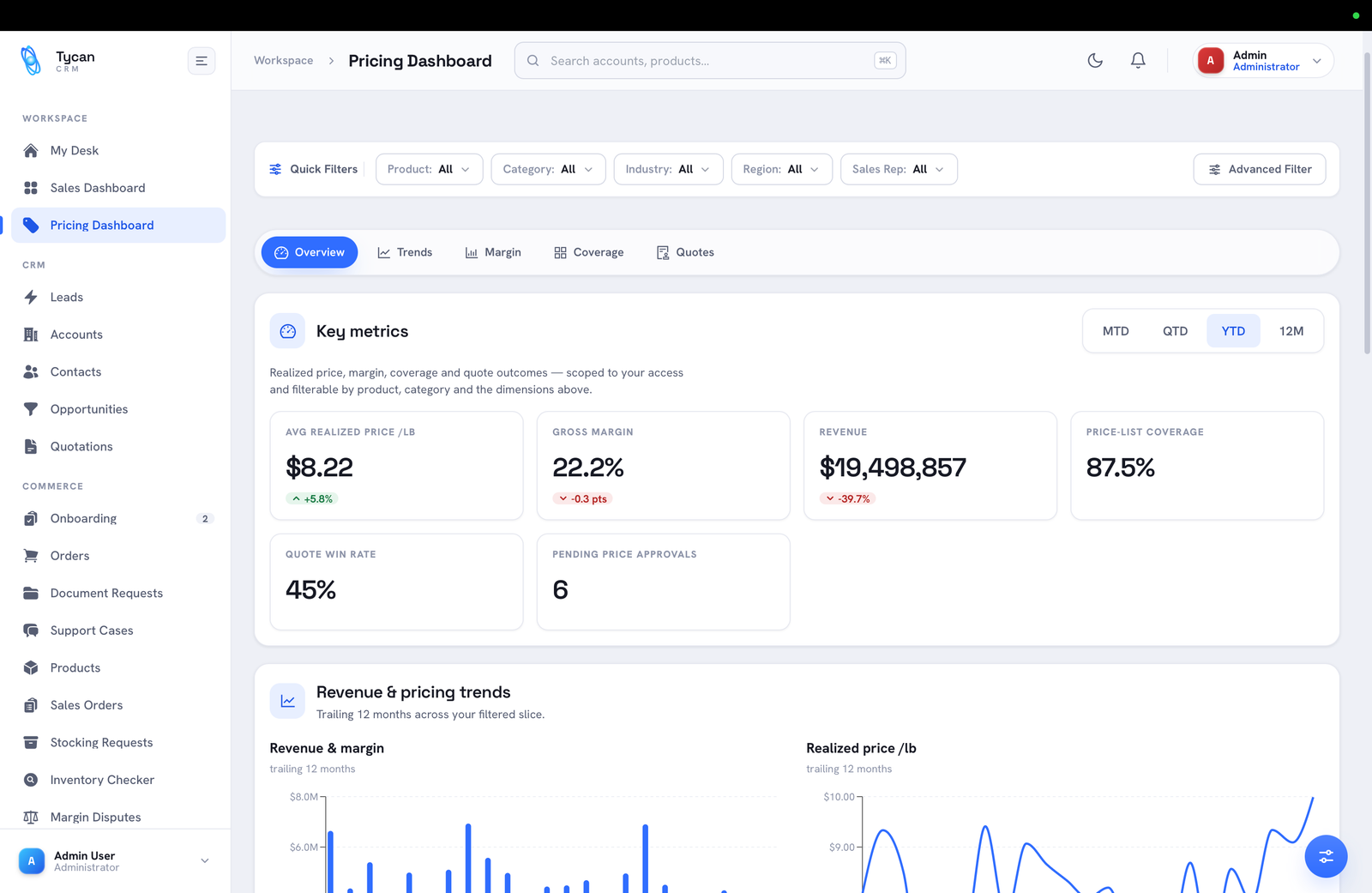
Disputes sit alongside a live view of realised price and margin.
Book a walkthrough and we'll show Margin Dispute — and the rest of the platform — working the way a chemical business runs.
CRM Module · 16
AI-assisted order creation without the re-keying — the order desk reads a purchase order in any language and builds the sales order for you, checking stock and margin as it goes.
Sales Order brings Tycan's flagship AI Order Management right into the CRM. Drop in a customer PO and the order desk reads it, matches products and account, and drafts the sales order — turning fifteen minutes of manual entry into a few minutes of review.
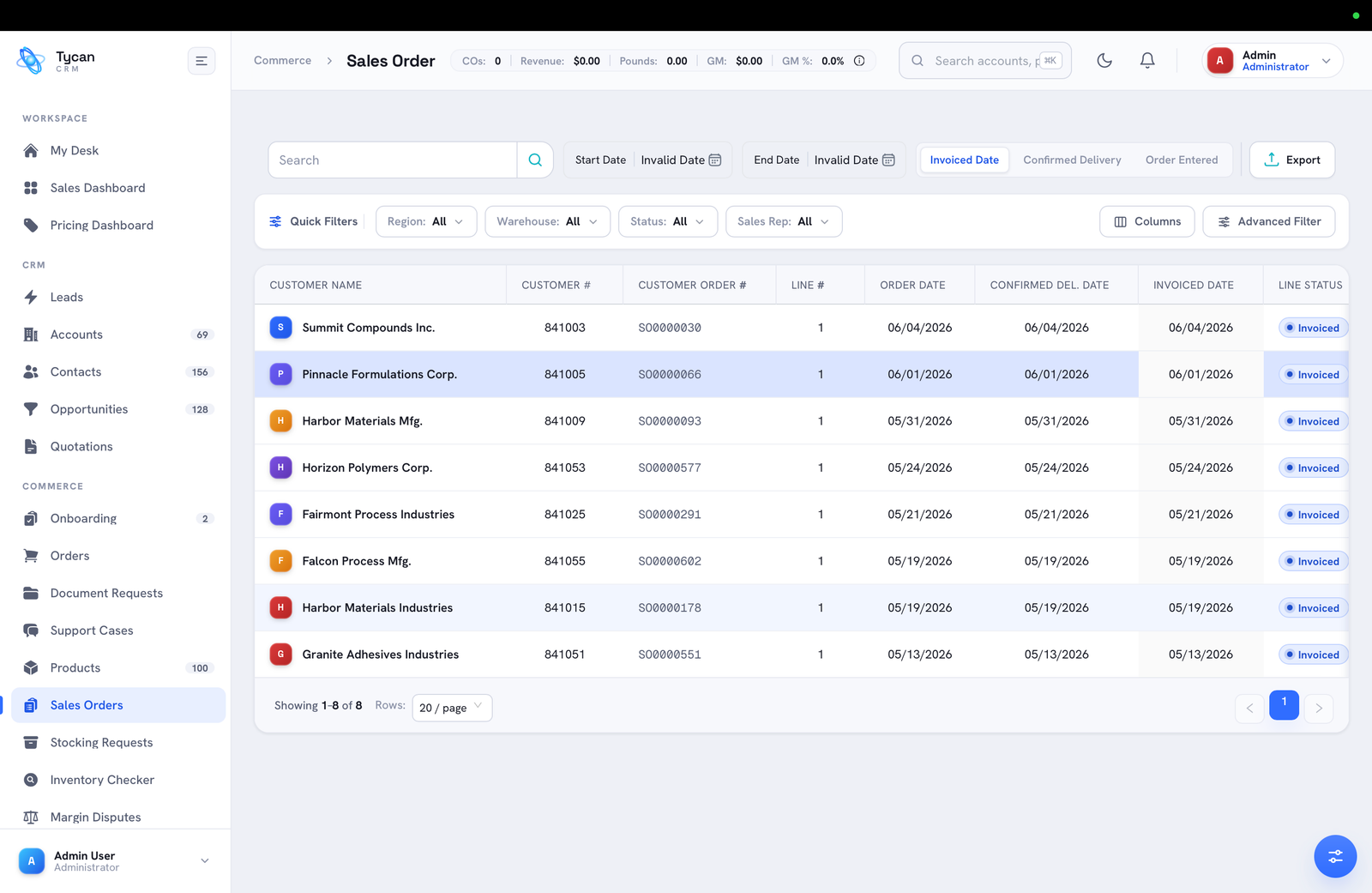
Four agents turn a PO into a checked, ready-to-ship order.
The PO Reader Agent extracts products, quantities and terms from a purchase order in any language or format — no manual typing.
The Order History Agent auto-fills recurring orders and learns each cycle, so repeat business is almost hands-free.
Live ERP stock is confirmed by the Inventory Check Agent and pricing watched by the Margin Guardrail Agent before the order commits.
The result is a clean sales order, tracked all the way to invoice.
Book a walkthrough and we'll show Sales Order (AI) — and the rest of the platform — working the way a chemical business runs.
CRM Module · 17
Roles, access and permissions in one place — so every user sees exactly the modules and data they should, matched to how your teams and regions work.
User Management decides who sees what. Configure roles and permissions so each person works within the modules, accounts and regions that are theirs — and no further — across the whole platform from one screen.
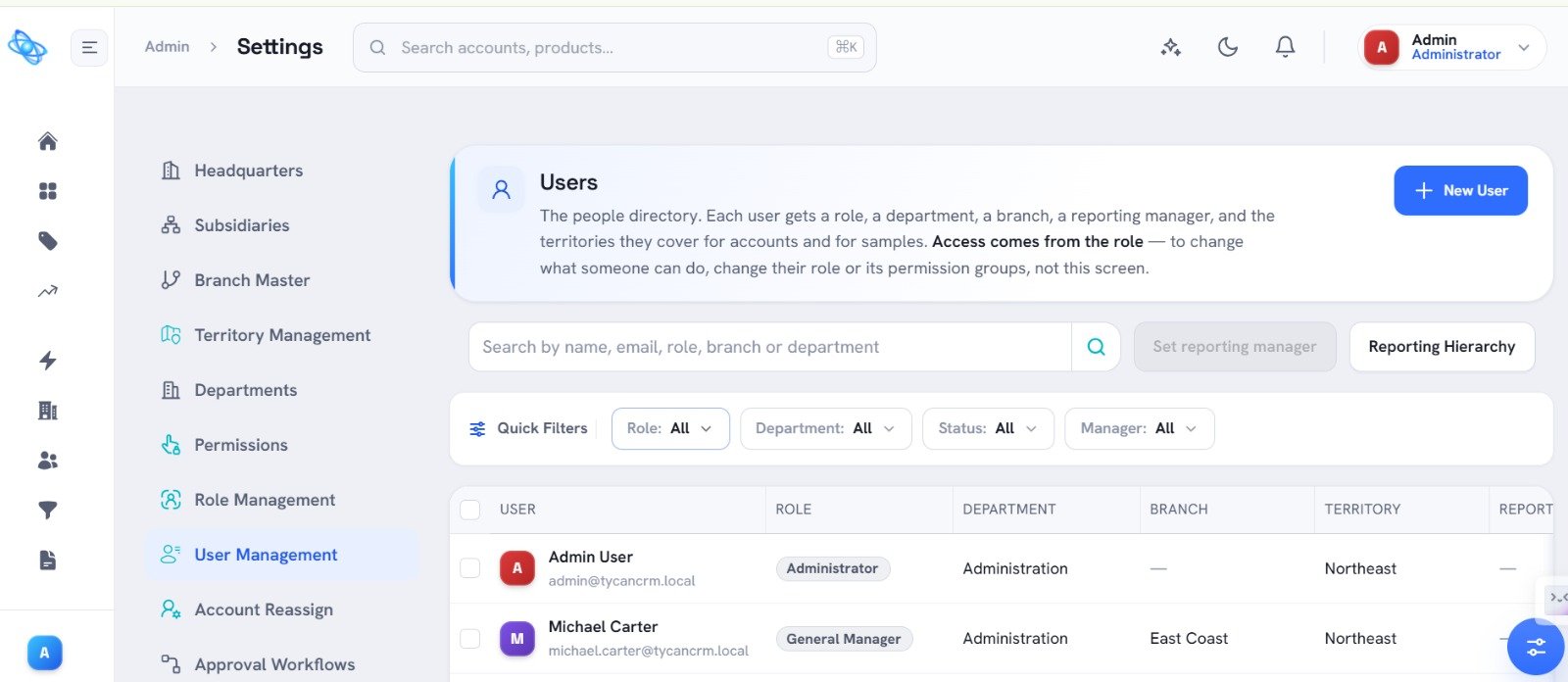
Roles, regions and teams define exactly what each person can reach.
Define roles once and assign them, controlling which modules and actions each person has across the CRM.
Limit visibility to the territories, branches and accounts a user is responsible for, so data stays with its owners.
New users inherit the access their role implies, so onboarding a rep or manager is quick and consistent.
Sensitive workflows stay with the right people, and every change is tracked.
Book a walkthrough and we'll show User Management — and the rest of the platform — working the way a chemical business runs.